After reading a entry on my friend Dick
Kusleika's blog
about
pixilation
I was compelled to construct this example.
The responses he received to his
follow-up
blog entry were a pleasant surprise
The display is constructed from a
standard xy chart. All of the chart data is calculated via worksheet
formula. The displays movement is manually controlled through a
scrollbar, although I have included a vba routine that can be copied to
a code module and used to automate the scrolling.
You can also construct you own typeface
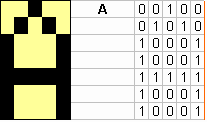
via the Alphabet worksheet. The example below shows how the letter A was
defined.
To build a new character you
simply enter a 1 in the appropriate location of the 5 by 7 matrix


 AJP Excel Information