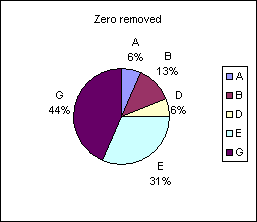
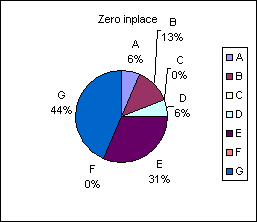
You can see from the above images the
effect of setting data items C and F to zero.
The
workbook contains an example of a pie chart that
automatically removes zero values from the pie and the legend.
The chart uses named ranges in order
to dynamically expand or contract.
The formulas used to remove zero data
points are courtesy of Doug Tyrrell (www.dotxls.com)
Updated to include formula to handle
data laid out in rows rather than columns.
There is a bug in xl2007 that if you set all of the
original data values to zero the named range formula will report
as reference error and then become detached from the
chart. It will not automatically update the chart when new values are entered in to the
data cells. To avoid this break of formula I have modified the named
range formula to always include 1 point. This will allow the chart to
automatically update when valid values are entered.
Note this does not remove the warning of invalid formula that will
appear with all cells are zero.


 AJP Excel Information